Last updated
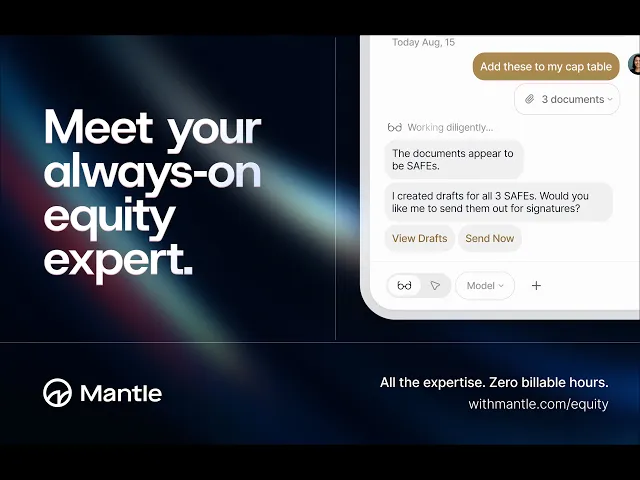
Mantle Clerk is your AI assistant, built directly into Mantle Equity. Ask questions about your cap table, take action on equity tasks, and move faster on the decisions that matter without ever leaving the platform.
What is Mantle Clerk?
Mantle Clerk is an AI-powered assistant that lives inside your Mantle account. It understands your cap table (your stakeholders, securities, vesting schedules, option grants, and more) so you can ask questions in plain language and get accurate, context-aware answers in seconds.
But Clerk isn't just for lookups. It can help you execute tasks too: drafting option grants, bulk updating permissions, reissuing documents for signature, and more.
Think of it as having an equity expert on call, 24/7, who already knows your data and can roll up their sleeves when you need them to.
What can Clerk help with?
Clerk is designed to handle the kinds of questions founders, operators, and law firms run into every day:
Understanding your cap table
"How many fully diluted shares do we have outstanding?"
"What's our current ownership breakdown by share class?"
"Who are our top 10 shareholders by ownership percentage?"
Execute equity tasks
Clerk can take action directly within your account — draft, prepare, and queue up work so you can review and confirm before anything is saved.
Draft option grants: describe the terms and Clerk builds the grant for your review
Bulk update stakeholder access: update view permissions across multiple stakeholders at once
Reissue board actions for signatures: resend documents that need to be re-executed without starting from scratch
Generate vesting schedules: describe what you want in plain English and Clerk translates it into a ready-to-confirm schedule
Migrate your cap table from other platforms: including Carta and Pulley
Plan and model scenarios
"How would a $5M SAFE at a $20M cap affect my ownership?"
"What's my post-money ownership if we close this round?"
"Model dilution for a new option pool of 10%."
How does Clerk work?
Clerk is grounded in your actual Mantle data. Every answer it gives is tied back to the documents and securities in your account, so you get answers that reflect your specific cap table.
When Clerk takes action, you stay in control. It drafts and prepares; you review and confirm. Nothing is saved or sent until you approve it.
When Clerk surfaces a number or a detail, it links back to the source document, so you can verify the context instantly. No more digging through PDFs to double-check a term.
Where to find Clerk
Clerk is available directly within your Mantle Equity's Home tab. You can also use Clerk from any other screen using the Clerk icon at the bottom right corner of the platform.
What Clerk doesn't do
Clerk is an information and analysis tool. It helps you understand and explore your equity data. It does not:
Make legal or tax decisions for you
Replace advice from your lawyer or accountant
Privacy and accuracy
Clerk runs on your company's data only. Mantle never trains its AI models on client data, so your cap table information stays private to your account.
Every answer Clerk provides is linked to a verified source within your documents and records. If Clerk isn't sure about something, it will tell you, and you can always reach out to the Mantle support team for help.
Getting started
Clerk is available on all Mantle Equity plans. If you're on the Starter plan and want to unlock Clerk alongside advanced features like 409A valuations, option exercising, and more, you can upgrade at any time.
👉 Explore Mantle's plans
👉 Contact support
Have a question Clerk couldn't answer? Reach out to our team. We're happy to help.