Last updated
What are stakeholders?
Stakeholders are the people and entities who own or may own a piece of your company—founders, employees, contractors, advisors, investors, and even your law firm in some cases. Mantle uses stakeholder records as the backbone of your cap table: every share, option, SAFE, or note is always tied to a stakeholder.
Keeping this list clean and complete is one of the simplest ways to keep your cap table accurate and investor‑ready.
Unlimited stakeholders
All Mantle plans (including our free plan) include unlimited stakeholders, so you don't need to think twice about adding everyone who touches your equity—this is encouraged, not something to ration.
Best practices for founders
Add stakeholders as early as possible, even before issuing their first security, so your offers and approvals always tie back to a real record.
Standardize naming and stakeholder types across the company to make reporting and investor updates cleaner.
Treat Mantle as your source of truth: when someone joins, leaves, or changes roles, update their stakeholder record alongside HR and payroll systems.
Stakeholder views in Mantle
All stakeholders will have access to view their own profile and holdings. They will not be able to see any other company information.
Creating a new stakeholder
When you’re about to issue equity, record a SAFE, or invite someone into the portal, you’ll often start by creating a stakeholder record.
Single upload
Open the Stakeholders section
From the left-hand navigation, go to the Stakeholders tab.
You'll see a table of existing stakeholders and basic details (name, email, relationship).
Add a new stakeholder
Click Add Stakeholder.
Choose whether you are adding an individual (e.g. an employee) or an institution (e.g. a fund).
Enter stakeholder details
Add the stakeholder's details, including:
Name
Alias
Email address
Stakeholder relationship
Address
Additional notes
Save the stakeholder
Review the information for typos.
Click Create.
The new stakeholder now appears in your stakeholders list and can be selected when issuing securities.
Bulk upload
If you're looking to upload multiple stakeholders at once, you can use Mantle's bulk upload feature.
Open the Stakeholders section
From the left-hand navigation, go to the Stakeholders tab.
You'll see a table of existing stakeholders and basic details (name, email, relationship).
Upload a Stakeholders CSV
Click Upload Stakeholders CSV.
You can upload a CSV that includes a list of all stakeholders. This should include columns for name, email address, and stakeholder relationship.
Editing and maintaining stakeholders
Over time, people change roles, leave the company, or update contact details. Mantle lets you keep their stakeholder record accurate without breaking historical data.
For companies using Rippling as their HRIS, you can use our integration to automatically sync employee data.
Bulk Stakeholder Creation/Editing
You can now make mass changes to your stakeholder list using Edit Mode. This turns your Mantle page into a spreadsheet that you can edit in-line by typing, selecting from a drop down, or copying and pasting from your own Excel document:

Updating a stakeholder's details
Open the Stakeholders section
From the left-hand navigation, go to the Stakeholders tab.
You'll see a table of existing stakeholders and basic details (name, email, relationship).
Select the stakeholder to update
Click on the stakeholder you wish to update.
Click the Actions button and select Edit.
Update details
Update any details you wish to change.
Review and save
Review then click Done to save.
Terminating a stakeholder
When a stakeholder leaves the company:
Open the Stakeholders section
From the left-hand navigation, go to the Stakeholders tab.
You'll see a table of existing stakeholders and basic details (name, email, relationship).
Select the terminated stakeholder
You can click on the stakeholder you'd like to update.
Click the Actions button and select Terminate.
Record termination details
Add termination details, including termination date, termination reason, and new stakeholder relationship.
Review and save
Review then click Done to save.
Holdings Expiry
Default exercise and repurchase periods are set per Equity Plan, where applicable. All relevant securities are set for termination by default. Securities can be exempted from termination by unchecking the row.
Avoiding duplicates
A few simple habits dramatically reduce cap table headaches:
Search before creating: Before adding a new stakeholder, search the list to see if they already exist under a slightly different name or email.
Use consistent naming for entities: For funds and companies, pick a canonical name ("Acme Ventures Fund I, L.P.") and stick to it.
Be careful with personal vs. work emails: Decide which you use for long-term access (often personal for individuals) and use that consistently across grants and invites.
Inviting stakeholders to Mantle
All stakeholders have the ability to view their own holdings in Mantle. They will not have the ability to view the company's cap table, unless they have been added as admin users.
When to invite a stakeholder
Typical moments to invite a stakeholder:
A new employee accepts a job offer and is ready to sign their option grant in Mantle.
An advisor or contractor needs to sign an equity agreement.
An investor needs read-only visibility into their holdings.
How to invite a stakeholder
Once a stakeholder is added to Mantle, they will be able to immediately log into their Mantle account using the same email associated with their stakeholder record.
You can send invites to stakeholders to view their holdings directly from the Stakeholders page in Mantle.
Select the stakeholders you want to invite and ensure they have an email address attached
Click on the envelope button on the top right to bring up email invitation dialog. Customize to your liking and send invitations

Stakeholder View
Stakeholders that have been invited to view their holdings in Mantle will have a much more streamlined view of the platform, as they will not be able to see anything beyond their holdings and a flag for Exercise eligibility.
Invite Email
Once invited, stakeholders receive this email sending them to the site to enter their email for login. They will receive a login link to access their account after entering their email address

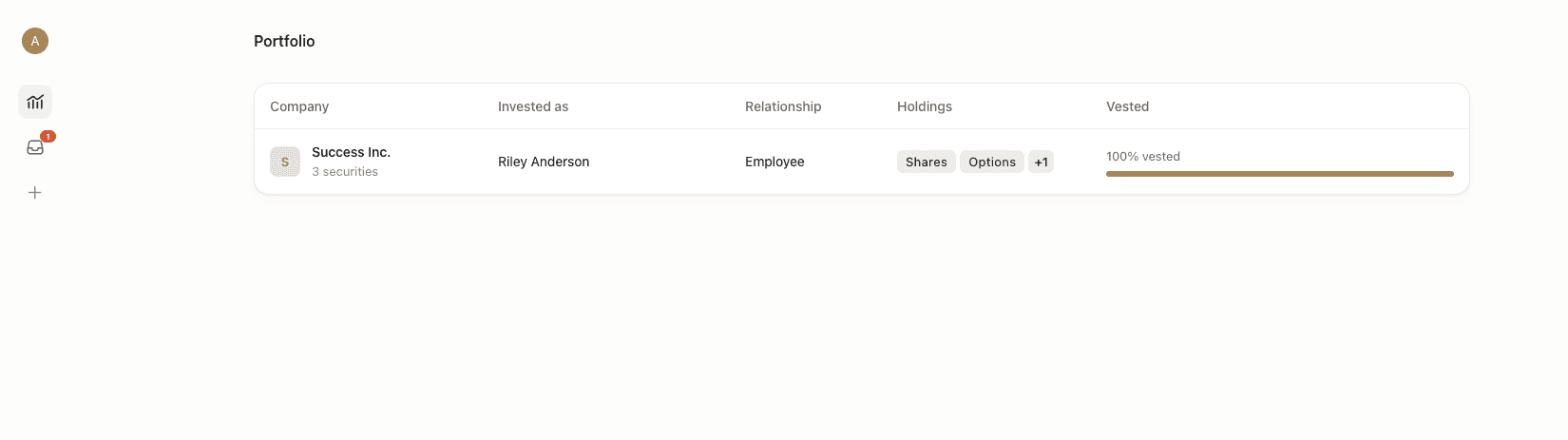
Portfolio View
Any companies the stakeholder has equity in will be listed on their Portfolio page for them to navigate to
Holdings and Exercises
After selecting a portfolio to view, the stakeholder will see two options: one that lists their holdings by type, and one that indicates any exercise tasks they have available


Stakeholders can click into individual securities to see additional details and documents that have been shared with them